 TradingAlpha
 Open Portfolio. Your holdings and quantities are private. Member-facing AlphaX trades use percentage information rather than exposing your account balances.
Add a manual holding
- Choose Add position.
- Search for the instrument and confirm the market.
- Enter direction, quantity, entry price, and the requested date information.
- Add a note if useful, then save.
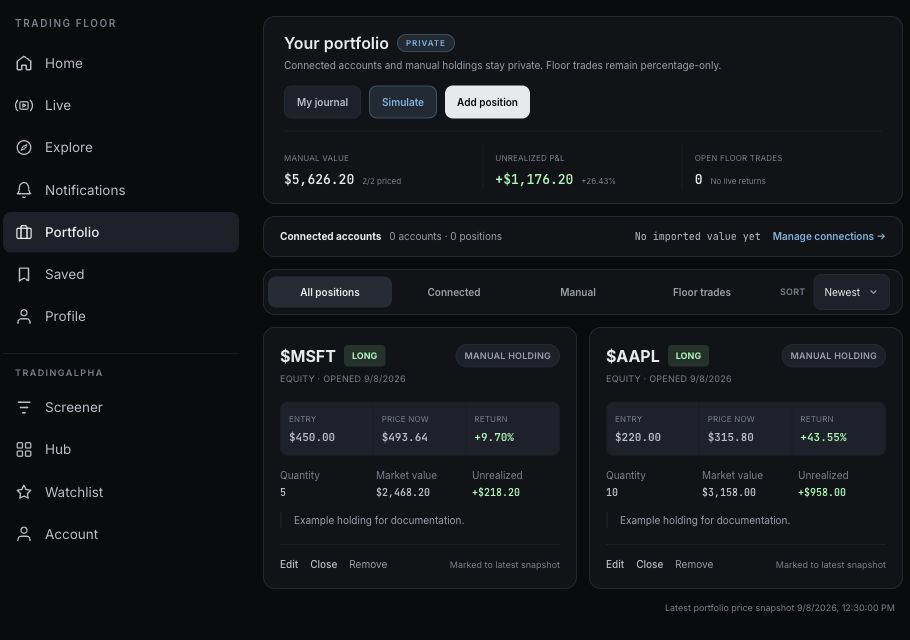
Sample holdings created solely for this guide; they are not investment recommendations.
Use the position's controls to edit or close your manual record. Enter the actual values you intend to record; the app does not know whether your broker filled a trade at a different price.
Read the totals
Use All positions, Connected, Manual, or AlphaX trades to choose what you are looking at. Check the summary labels: manual value, manual unrealized P&L, and AlphaX trade percentages are not all the same measure.
A missing quote can leave a holding unpriced. Check how many positions are priced before interpreting a total. Connected balances can be grouped by currency, so do not combine them as if they were all USD.
Connected accounts
When brokerage connections are enabled, Manage connections opens Account. See brokerage connections for read-only access and refresh behavior. This feature is not currently enabled on every deployment.
Review your journal
Use My journal to review your trade record and confirmed closes.