 TradingAlpha
 Create a trade record
Choose the trade option in the AlphaX composer. Select the correct asset and direction, then complete the entry, stop, and other fields the form requires. Review the audience before submitting: a member trade and a private journal entry are different publication choices.
An AlphaX trade is a record and discussion tool. It does not submit an order to a broker. A tracked return is not proof of an executed fill.
Manage the trade
Open your trade and use the available stop, update, or close controls. Read the confirmation and validation messages. Recorded stop changes and closed results form part of the trade's history; do not expect every published value to behave like an editable note.
Review your journal
Open Portfolio → My journal to review your records. Use All sources / AlphaX trades / Manual trades and All statuses / Open / Closed to choose your review. Record past trade lets you enter a completed manual trade. Statistics use confirmed closes only. Compare results within the same basis rather than treating a list of percentage outcomes as an account statement.
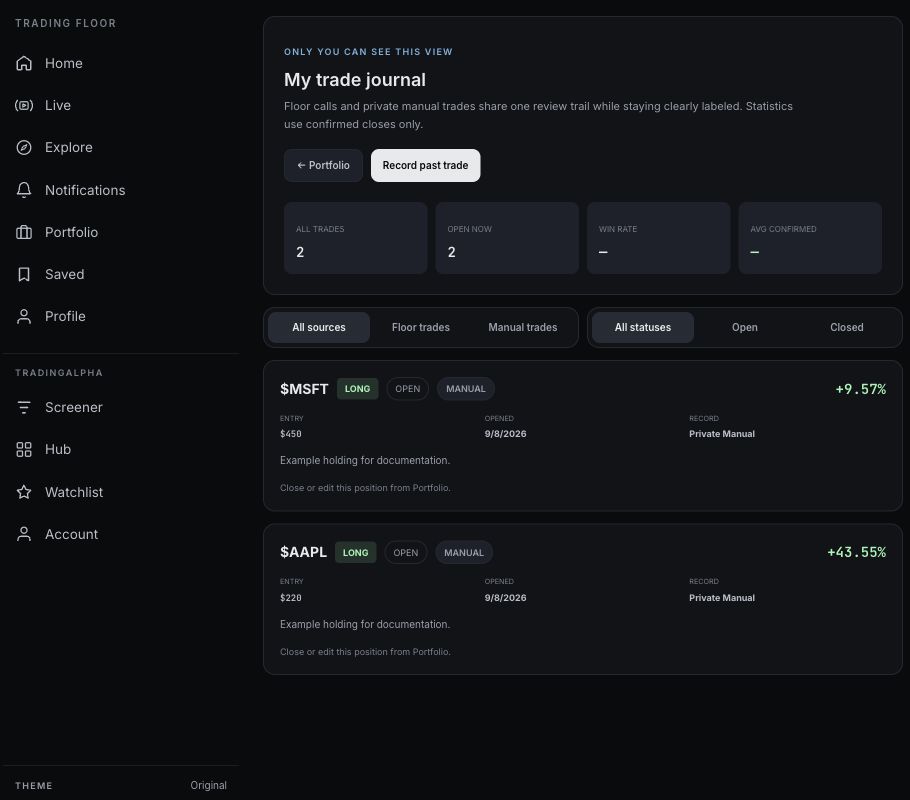
The journal includes the guide account’s sample manual holdings; no community trades were published for this capture.
Rankings and points
Where AlphaX shows performance, ranking, or participation information, read the metric's label. Community points and trade returns measure different things. A leaderboard is not a verification of someone's entire brokerage history.